> ## Documentation Index
> Fetch the complete documentation index at: https://berachain-422fce37-docs-staking-pool-install-cli.mintlify.site/llms.txt
> Use this file to discover all available pages before exploring further.

# Borrow & Repay

> Supply collateral, borrow BUSD, monitor LTV/LLTV, and repay to withdraw collateral on Bend.

Follow these steps to supply collateral, borrow \$BUSD, and repay to free your collateral.

## Requirements

* Wallet with collateral (WETH, WBERA, WBTC, etc.) listed on [Bend](https://bend.berachain.com/borrow)
* Native \$BERA for transaction fees

<Tip>
  If you don't have collateral, swap on [Berachain Hub](https://hub.berachain.com/swap).
</Tip>

## Supply collateral and borrow

Supply \$\$WBERA as collateral and borrow \$BUSD.

<Steps>
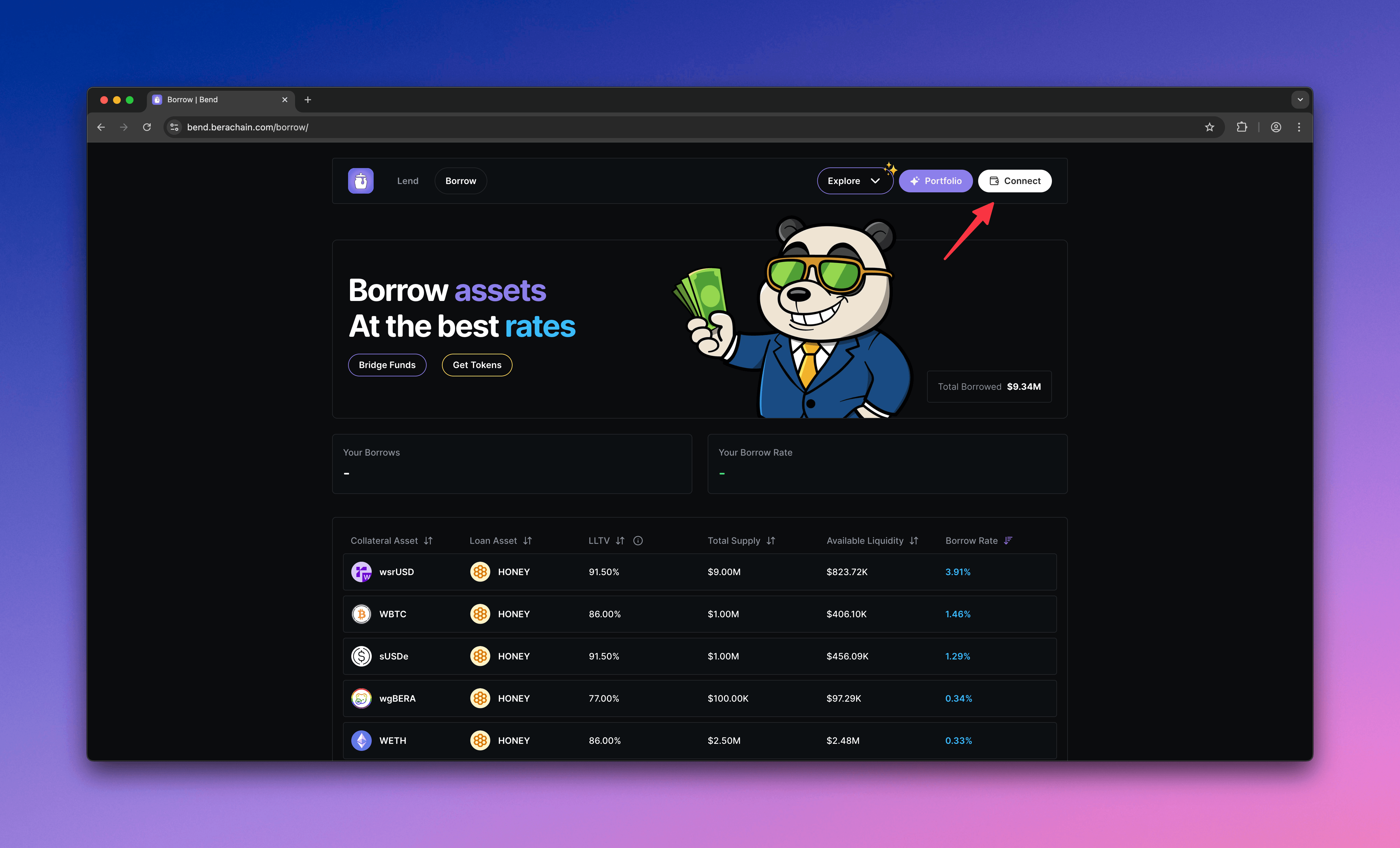
  <Step title="Visit Bend and connect wallet">
    Go to [Bend](https://bend.berachain.com/borrow) and connect your wallet.
    <Frame>
      <img src="https://mintcdn.com/berachain-422fce37-docs-staking-pool-install-cli/GpovaHpJph8S_rDh/images/bend/borrow-connect-wallet.png?fit=max&auto=format&n=GpovaHpJph8S_rDh&q=85&s=065553ec89232391b228498c29787b55" alt="Bend borrow connect wallet" width="4384" height="2654" data-path="images/bend/borrow-connect-wallet.png" />
    </Frame>
  </Step>

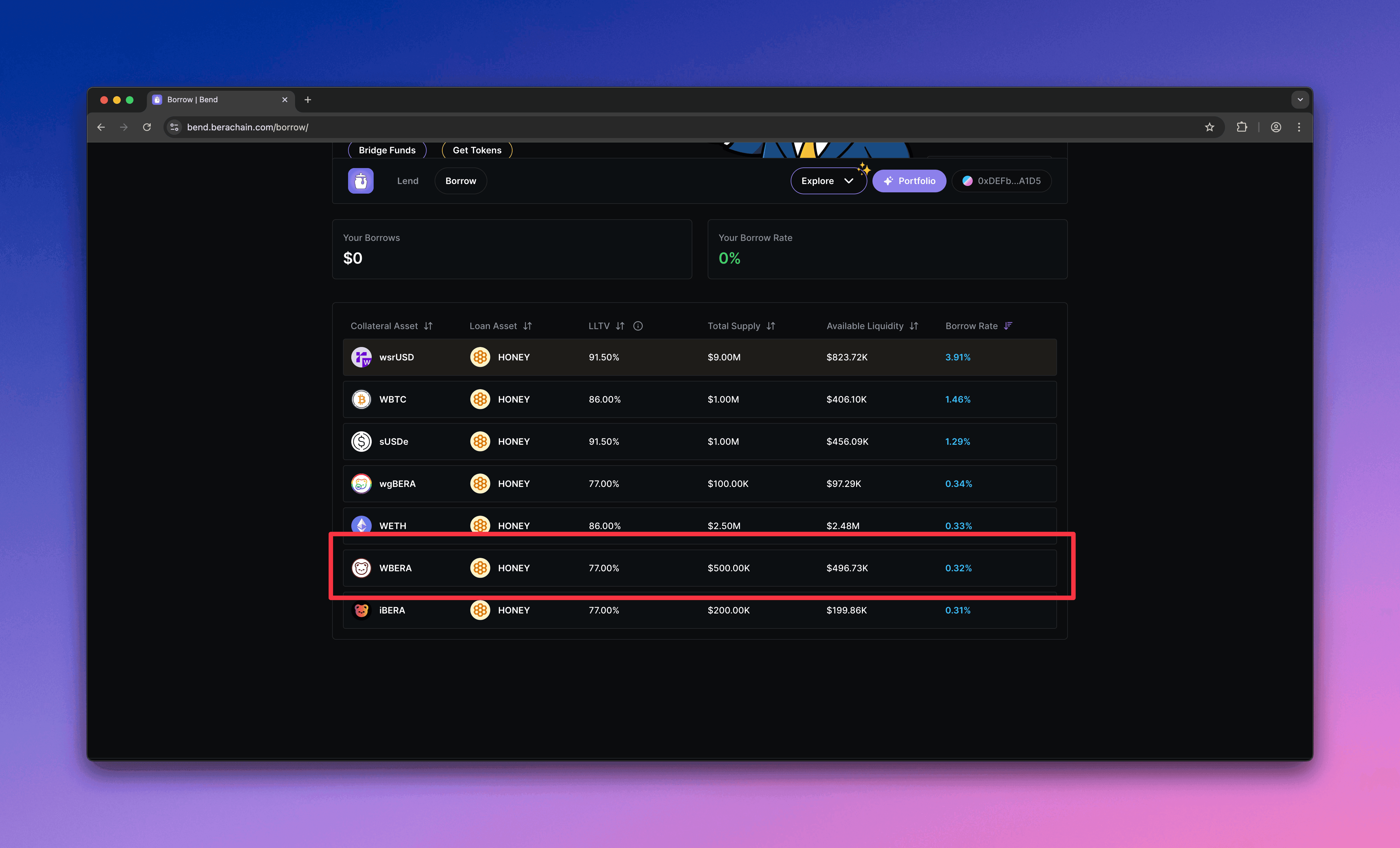
  <Step title="Choose a market">
    Choose a market where you can supply collateral. This guide uses \$WBERA.
    <Frame>
      <img src="https://mintcdn.com/berachain-422fce37-docs-staking-pool-install-cli/GpovaHpJph8S_rDh/images/bend/borrow-choose-market.png?fit=max&auto=format&n=GpovaHpJph8S_rDh&q=85&s=d95e595dddd02c064475a0a1490d4387" alt="Bend choose market" width="4384" height="2654" data-path="images/bend/borrow-choose-market.png" />
    </Frame>
  </Step>

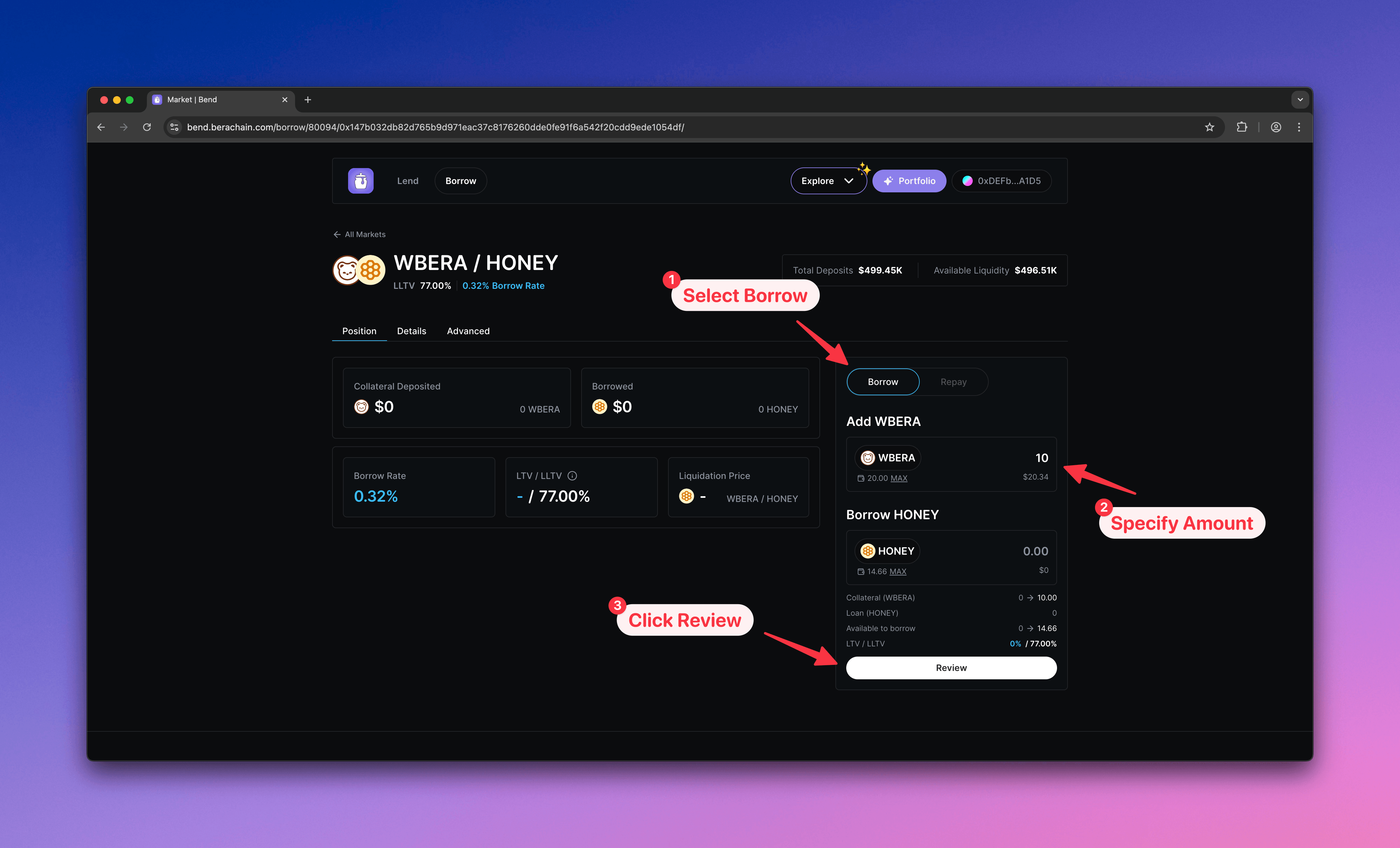
  <Step title="Configure borrow">
    1. Select **Borrow**
    2. Enter the \$WBERA amount to supply as collateral
    3. Click **Review** to open the confirmation modal
    <Frame>
      <img src="https://mintcdn.com/berachain-422fce37-docs-staking-pool-install-cli/GpovaHpJph8S_rDh/images/bend/borrow-configure-borrow.png?fit=max&auto=format&n=GpovaHpJph8S_rDh&q=85&s=1a43aeed5e4b2d8ba7b4b819ca15117a" alt="Bend configure borrow" width="4384" height="2654" data-path="images/bend/borrow-configure-borrow.png" />
    </Frame>
  </Step>

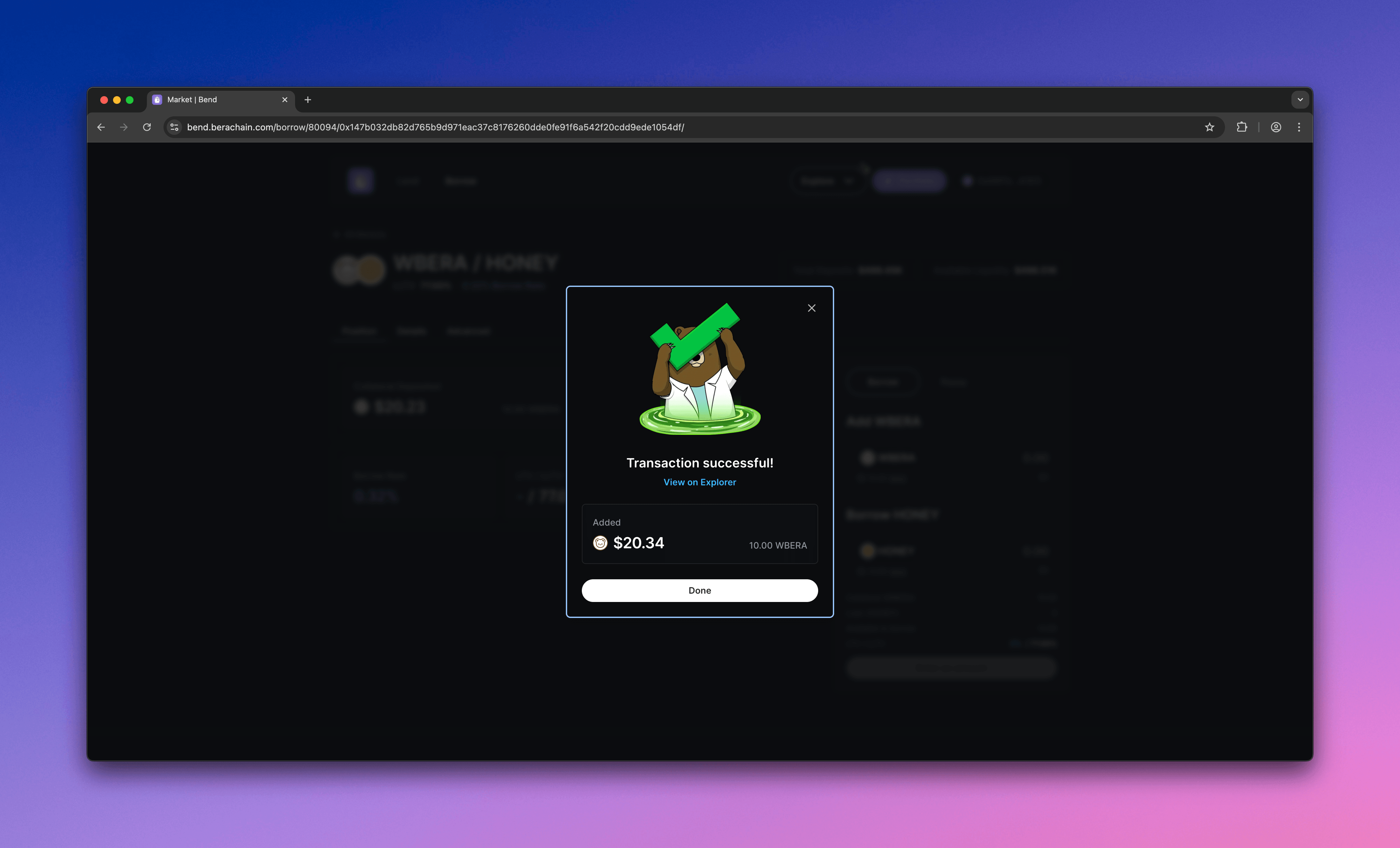
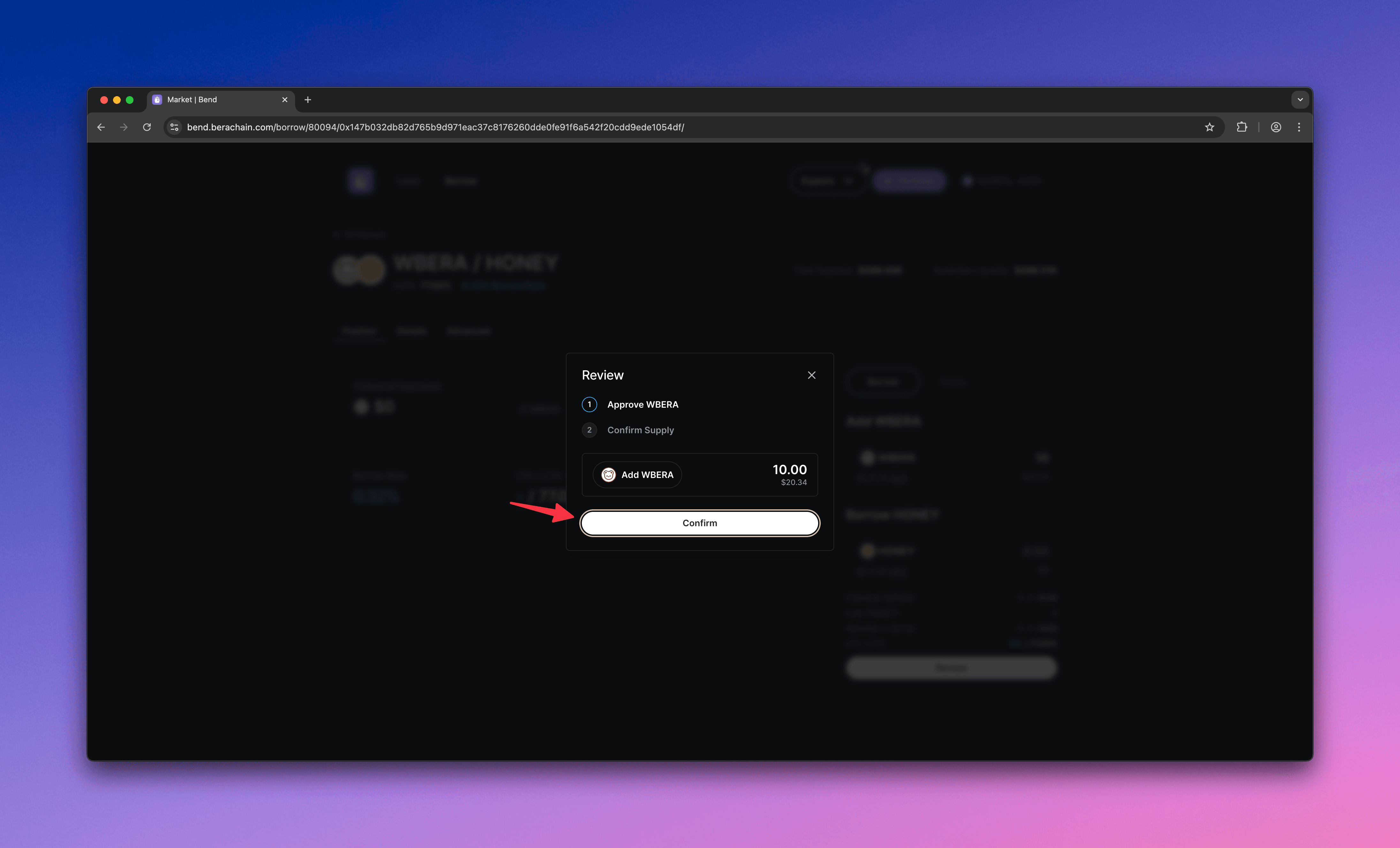
  <Step title="Approve and supply">
    1. Approve the market to spend your \$WBERA
    2. Supply \$WBERA as collateral
    <Frame>
      <img src="https://mintcdn.com/berachain-422fce37-docs-staking-pool-install-cli/GpovaHpJph8S_rDh/images/bend/borrow-approve-supply.png?fit=max&auto=format&n=GpovaHpJph8S_rDh&q=85&s=54eedc20a0824e93366cad49a4d3ea94" alt="Bend approve and supply" width="4384" height="2654" data-path="images/bend/borrow-approve-supply.png" />
    </Frame>

    <Frame>
      <img src="https://mintcdn.com/berachain-422fce37-docs-staking-pool-install-cli/GpovaHpJph8S_rDh/images/bend/borrow-successful-approve-supply.png?fit=max&auto=format&n=GpovaHpJph8S_rDh&q=85&s=08255f22239d8abd57bb1260515ad835" alt="Bend successful approve and supply" width="4384" height="2654" data-path="images/bend/borrow-successful-approve-supply.png" />
    </Frame>

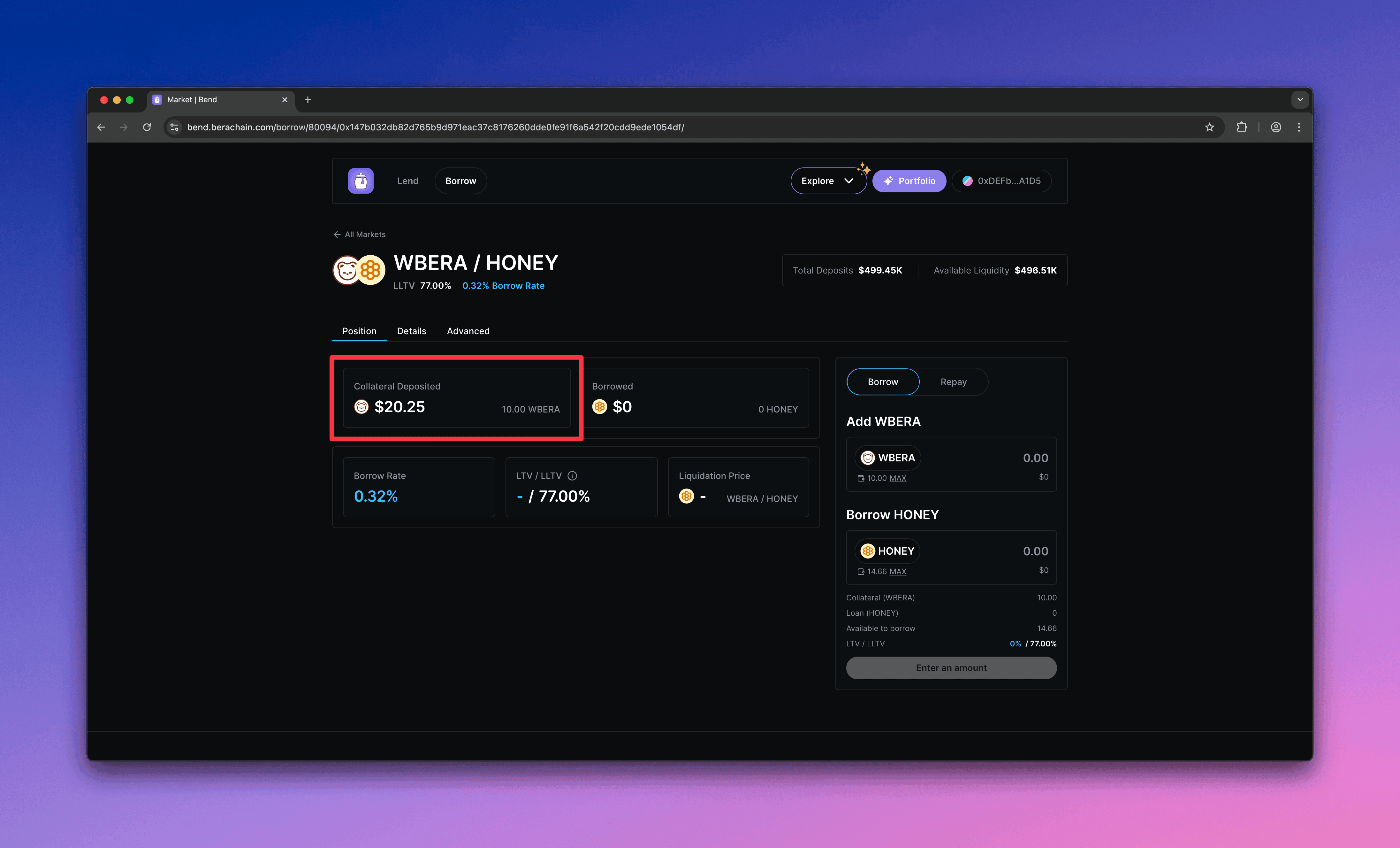
    You should see your supplied collateral and total value in the market.
    <Frame>
      <img src="https://mintcdn.com/berachain-422fce37-docs-staking-pool-install-cli/GpovaHpJph8S_rDh/images/bend/borrow-successful-supply.png?fit=max&auto=format&n=GpovaHpJph8S_rDh&q=85&s=8db2ca965e076ce51b2062d3995cfd7f" alt="Bend successful supply" width="4384" height="2654" data-path="images/bend/borrow-successful-supply.png" />
    </Frame>
  </Step>

  <Step title="Borrow">
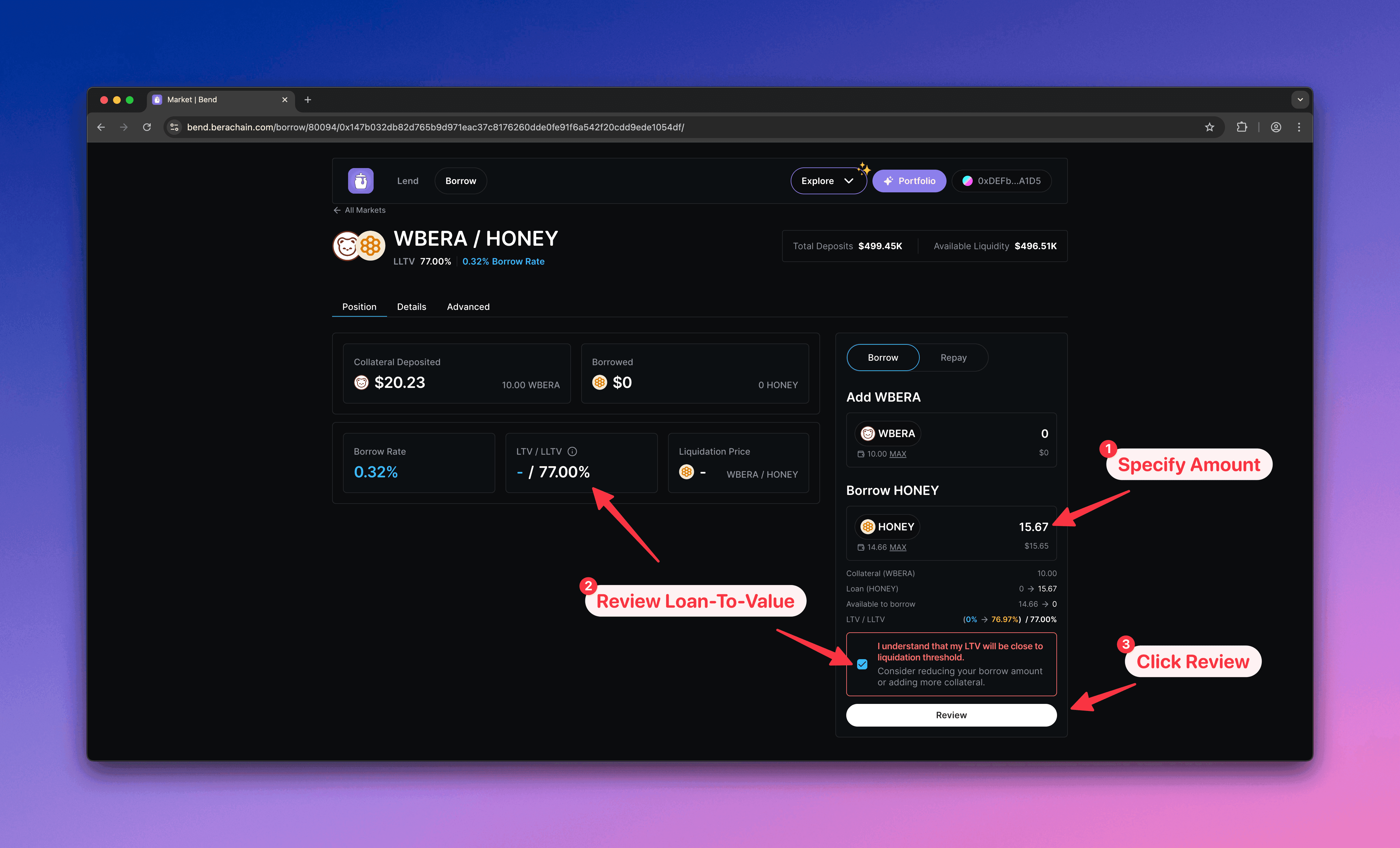
    1. Enter the \$BUSD amount to borrow
    2. Keep borrow below the LTV limit to avoid liquidation
    3. Click **Review** to confirm
    <Frame>
      <img src="https://mintcdn.com/berachain-422fce37-docs-staking-pool-install-cli/GpovaHpJph8S_rDh/images/bend/borrow-borrow.png?fit=max&auto=format&n=GpovaHpJph8S_rDh&q=85&s=ab8bba01319d9eb0fd6130ef5e58d3bb" alt="Bend borrow" width="4384" height="2654" data-path="images/bend/borrow-borrow.png" />
    </Frame>
  </Step>

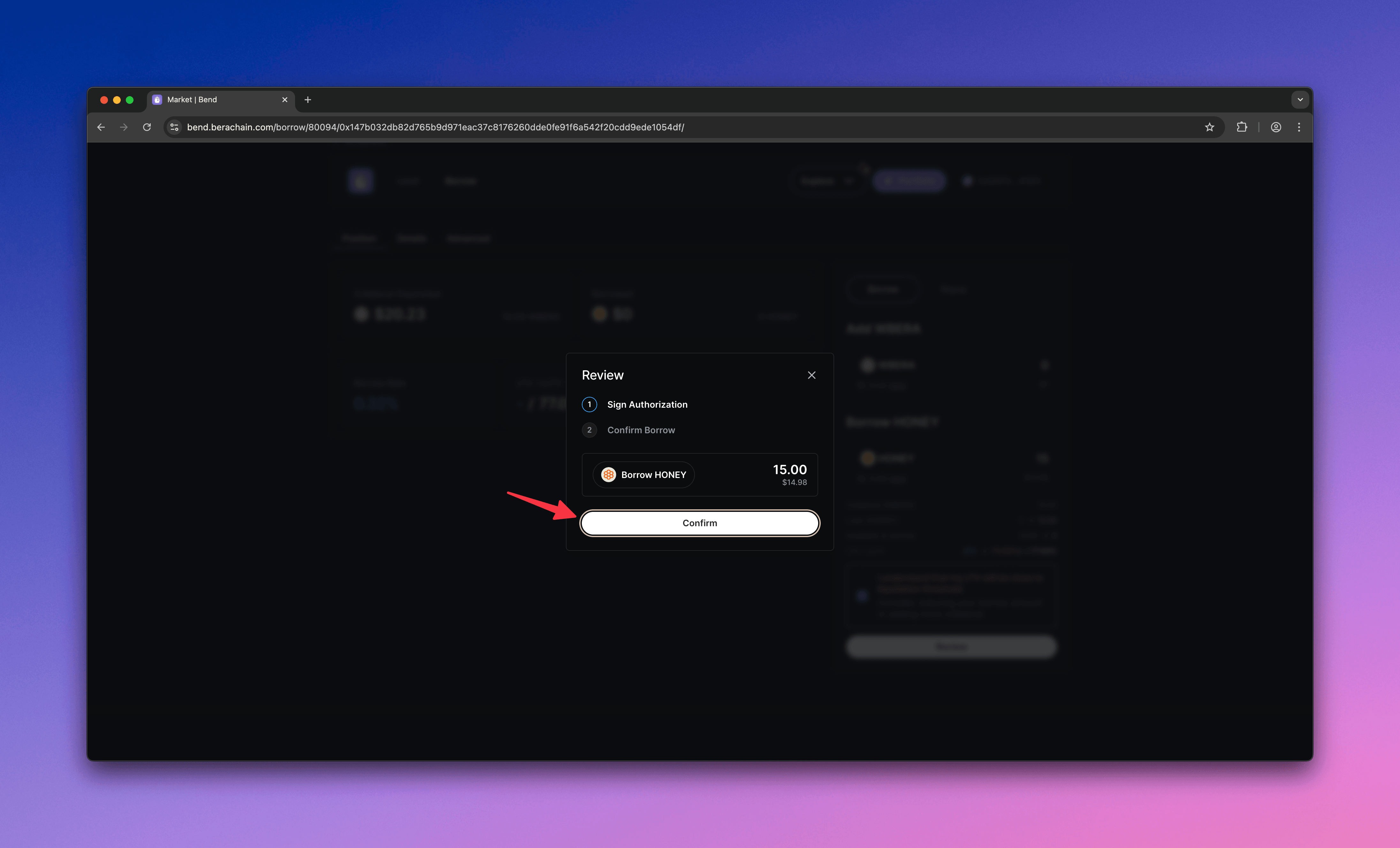
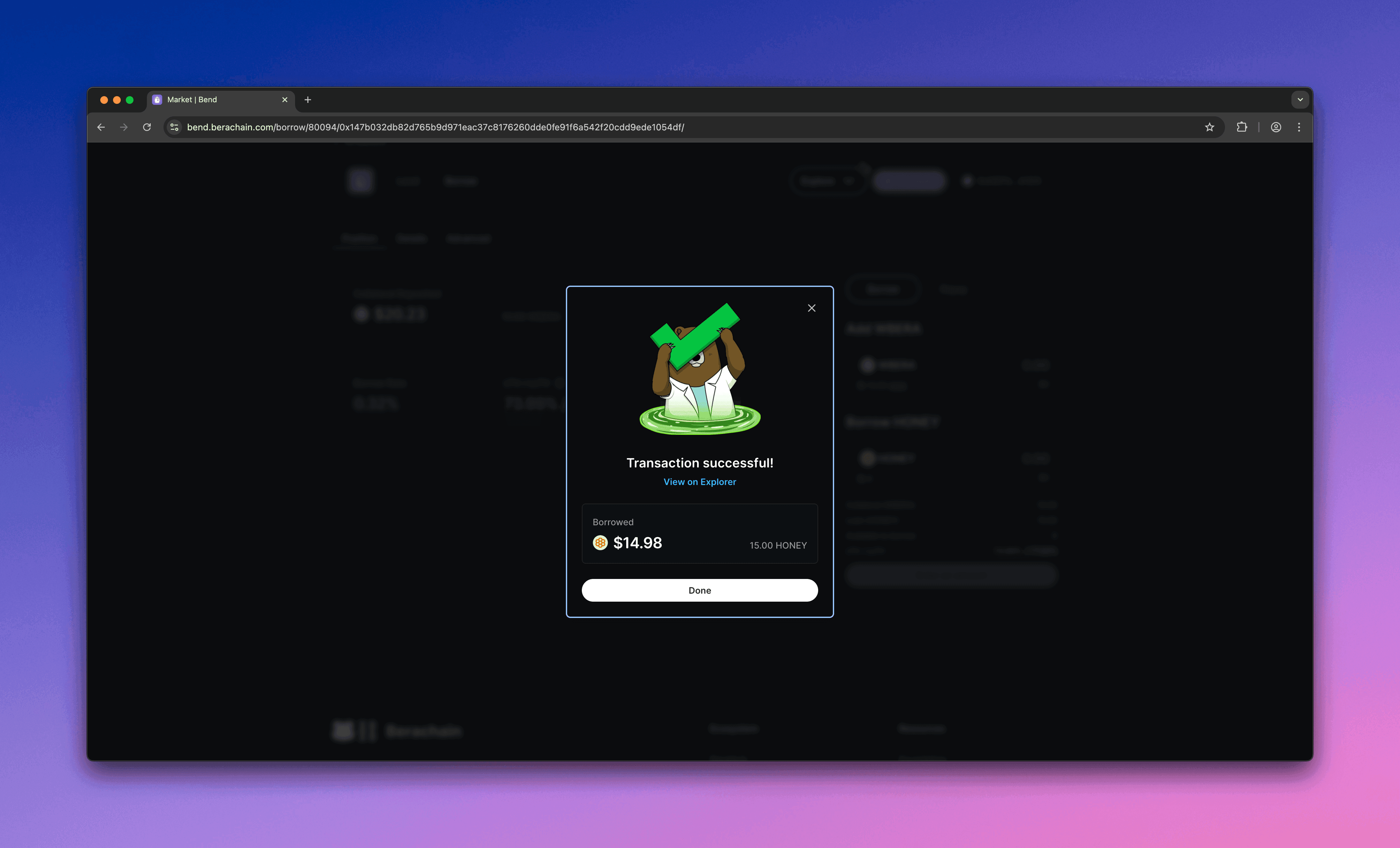
  <Step title="Approve and borrow">
    Approve the borrow in your wallet.

    <Frame>
      <img src="https://mintcdn.com/berachain-422fce37-docs-staking-pool-install-cli/GpovaHpJph8S_rDh/images/bend/borrow-approve-borrow.png?fit=max&auto=format&n=GpovaHpJph8S_rDh&q=85&s=9eb5751a7ab76e843aa364fcdc20d471" alt="Bend approve borrow" width="4384" height="2654" data-path="images/bend/borrow-approve-borrow.png" />
    </Frame>

    <Frame>
      <img src="https://mintcdn.com/berachain-422fce37-docs-staking-pool-install-cli/GpovaHpJph8S_rDh/images/bend/borrow-successful-approve-borrow.png?fit=max&auto=format&n=GpovaHpJph8S_rDh&q=85&s=d4166f0fa18c64fe64d335416b57e954" alt="Bend successful approve borrow" width="4384" height="2654" data-path="images/bend/borrow-successful-approve-borrow.png" />
    </Frame>

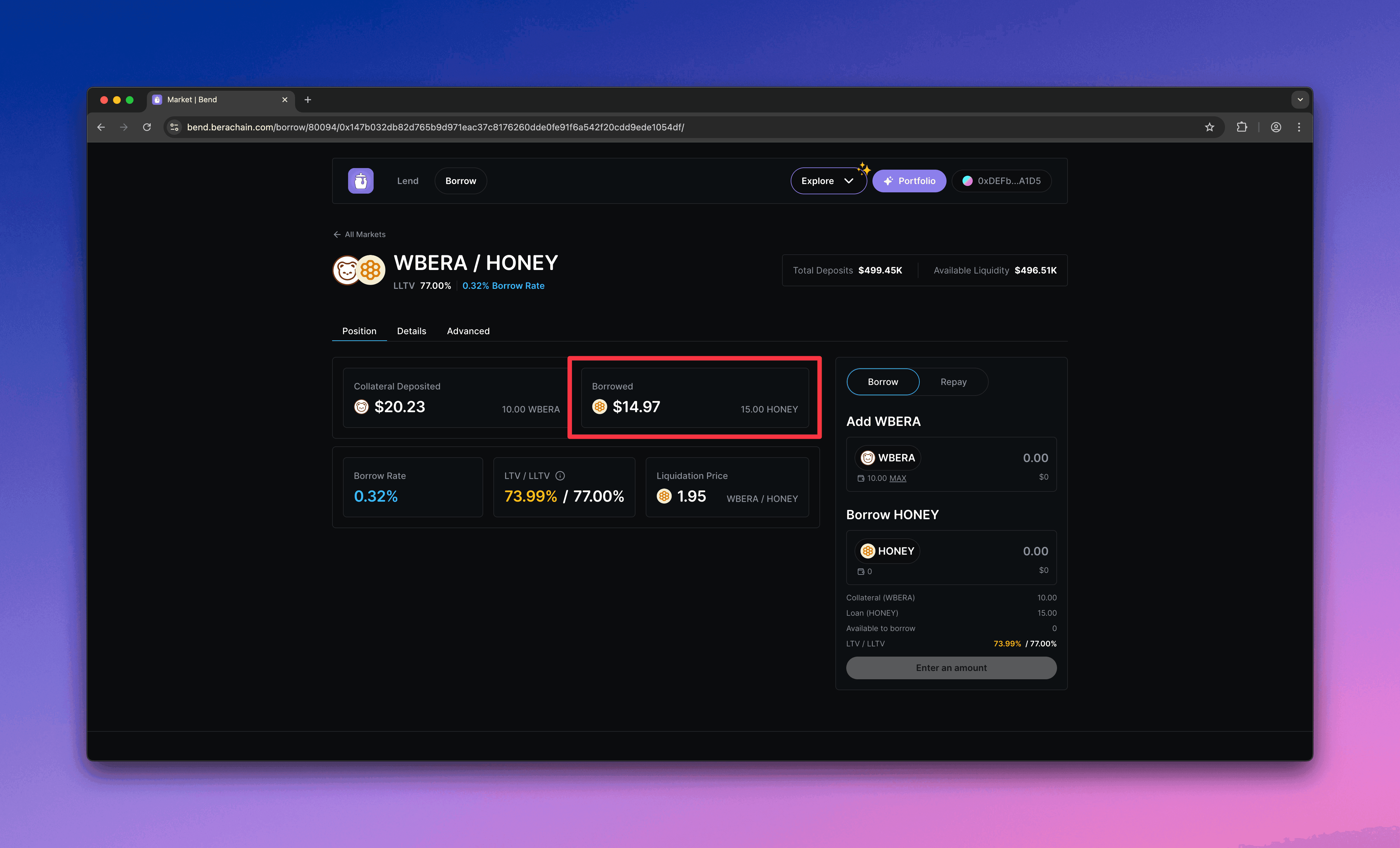
    You should see your borrowed \$BUSD and its value in the market.
    <Frame>
      <img src="https://mintcdn.com/berachain-422fce37-docs-staking-pool-install-cli/GpovaHpJph8S_rDh/images/bend/borrow-successful-borrow.png?fit=max&auto=format&n=GpovaHpJph8S_rDh&q=85&s=8cddea93b66802644c56bb229c40edaf" alt="Bend successful borrow" width="4384" height="2654" data-path="images/bend/borrow-successful-borrow.png" />
    </Frame>
  </Step>

  <Step title="Avoid liquidation">
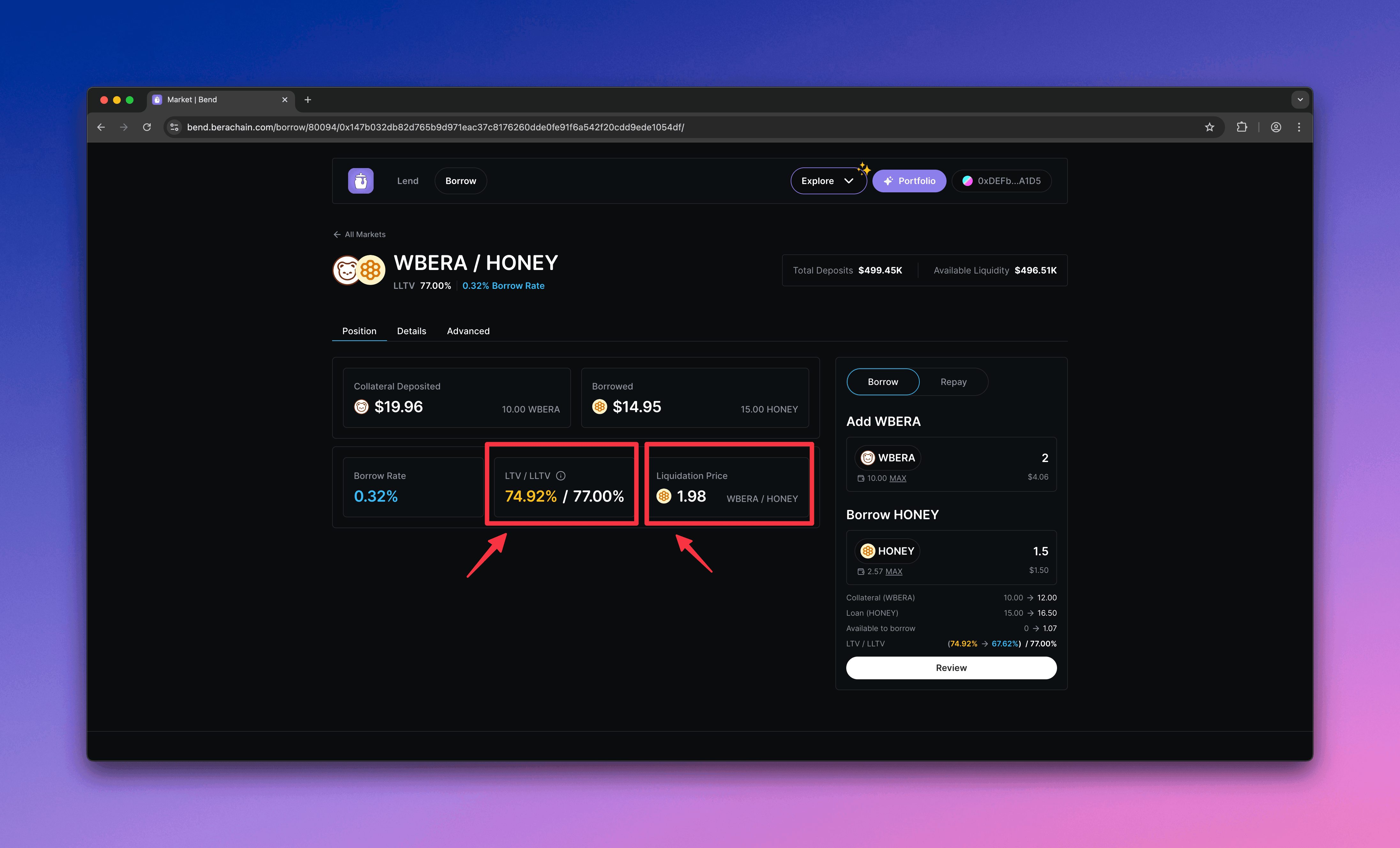
    Monitor your position. If your LTV exceeds the Liquidation LTV (LLTV), your position can be liquidated.
    <Frame>
      <img src="https://mintcdn.com/berachain-422fce37-docs-staking-pool-install-cli/GpovaHpJph8S_rDh/images/bend/borrow-monitor-ltv-lltv.png?fit=max&auto=format&n=GpovaHpJph8S_rDh&q=85&s=68f3ebbe17521838f42a7811b69b5575" alt="Bend monitor LTV and LLTV" width="4384" height="2654" data-path="images/bend/borrow-monitor-ltv-lltv.png" />
    </Frame>
  </Step>
</Steps>

## Repay and withdraw

Repay \$BUSD and withdraw your \$\$WBERA collateral.

<Steps>
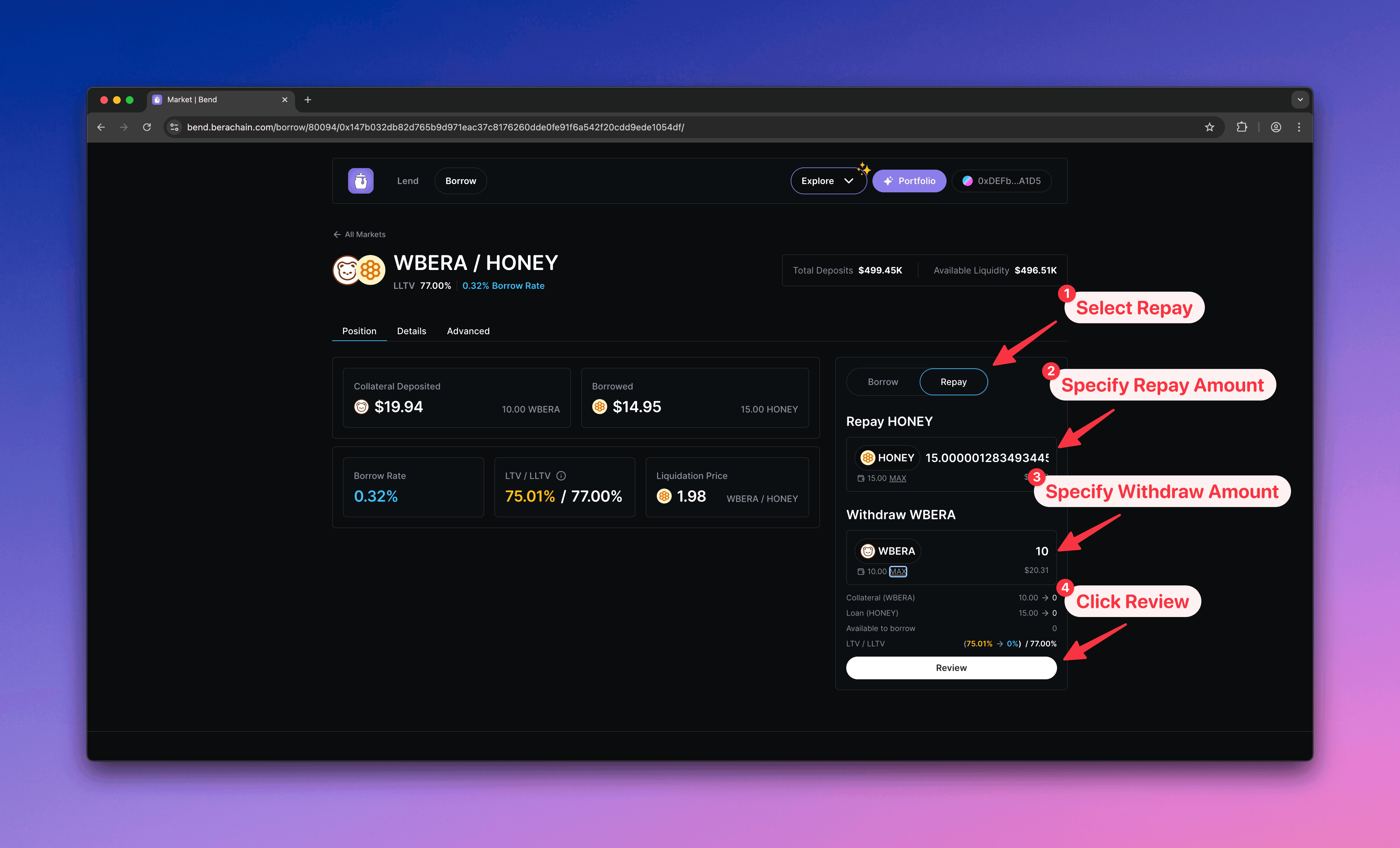
  <Step title="Configure repay">
    1. Select **Repay**
    2. Enter the \$BUSD amount to repay
    3. Enter the \$WBERA amount to withdraw
    4. Click **Review** to open the confirmation modal
    <Frame>
      <img src="https://mintcdn.com/berachain-422fce37-docs-staking-pool-install-cli/GpovaHpJph8S_rDh/images/bend/repay-configure-repay.png?fit=max&auto=format&n=GpovaHpJph8S_rDh&q=85&s=7416808653f18b498e12ab64ad98bae2" alt="Bend configure repay" width="4384" height="2654" data-path="images/bend/repay-configure-repay.png" />
    </Frame>
  </Step>

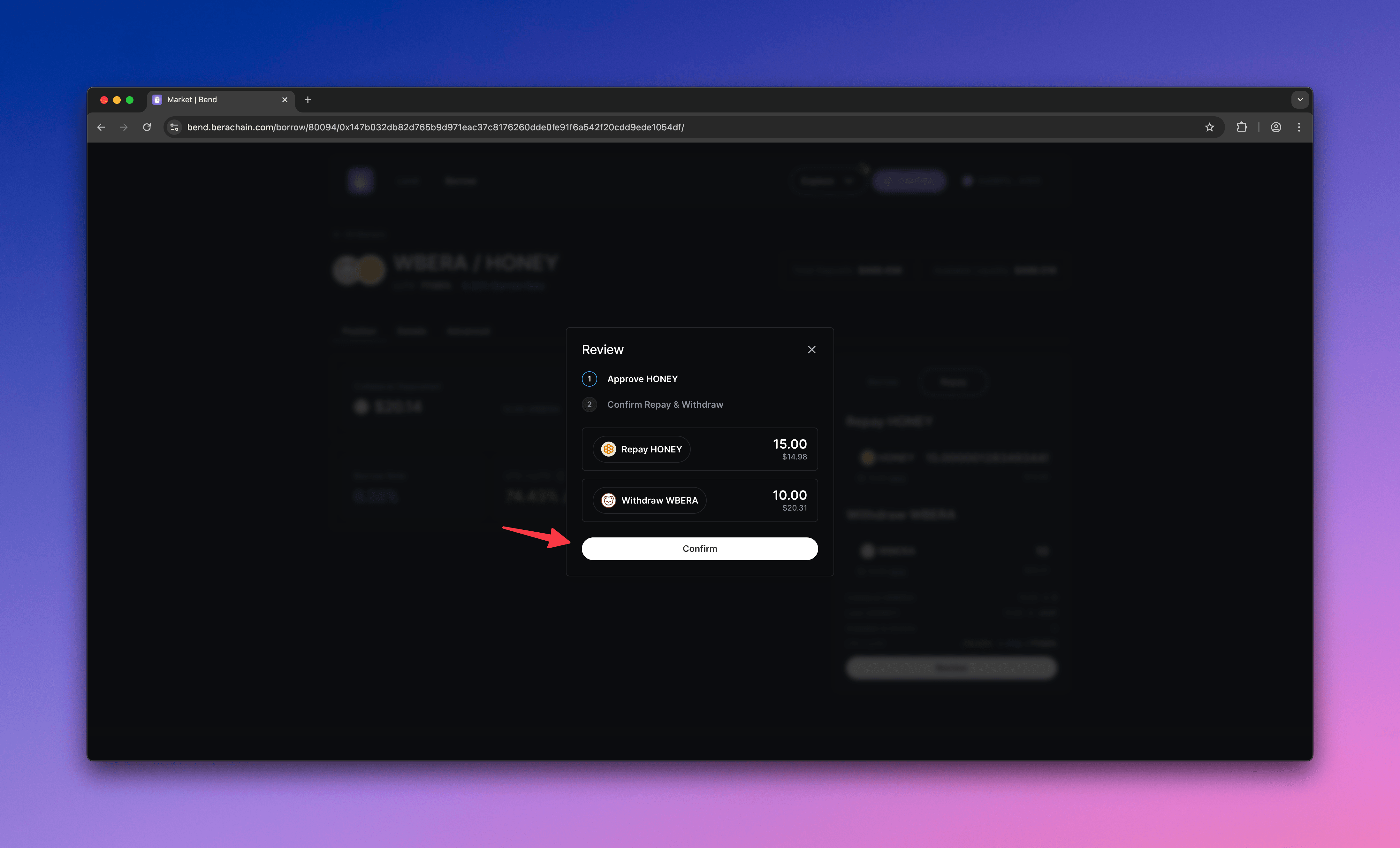
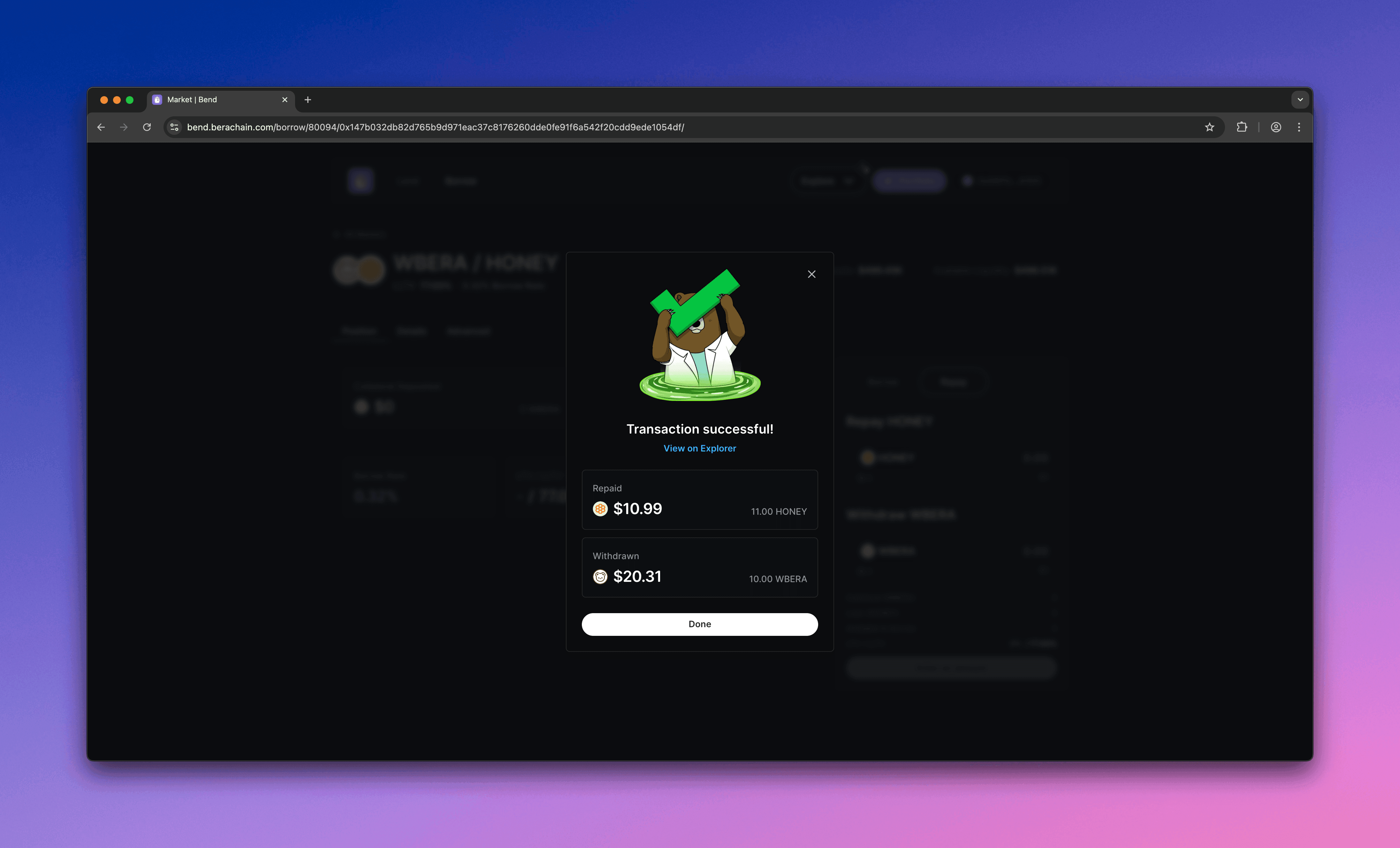
  <Step title="Confirm repay">
    Confirm the repayment in your wallet.
    <Frame>
      <img src="https://mintcdn.com/berachain-422fce37-docs-staking-pool-install-cli/GpovaHpJph8S_rDh/images/bend/repay-confirm-repay.png?fit=max&auto=format&n=GpovaHpJph8S_rDh&q=85&s=ace5fc89257d84b4acea12cf15247cdd" alt="Bend confirm repay" width="4384" height="2654" data-path="images/bend/repay-confirm-repay.png" />
    </Frame>

    <Frame>
      <img src="https://mintcdn.com/berachain-422fce37-docs-staking-pool-install-cli/GpovaHpJph8S_rDh/images/bend/repay-successful-confirm-repay.png?fit=max&auto=format&n=GpovaHpJph8S_rDh&q=85&s=22cc7aad5322cda8793e08463f3ea69a" alt="Bend successful confirm repay" width="4384" height="2654" data-path="images/bend/repay-successful-confirm-repay.png" />
    </Frame>

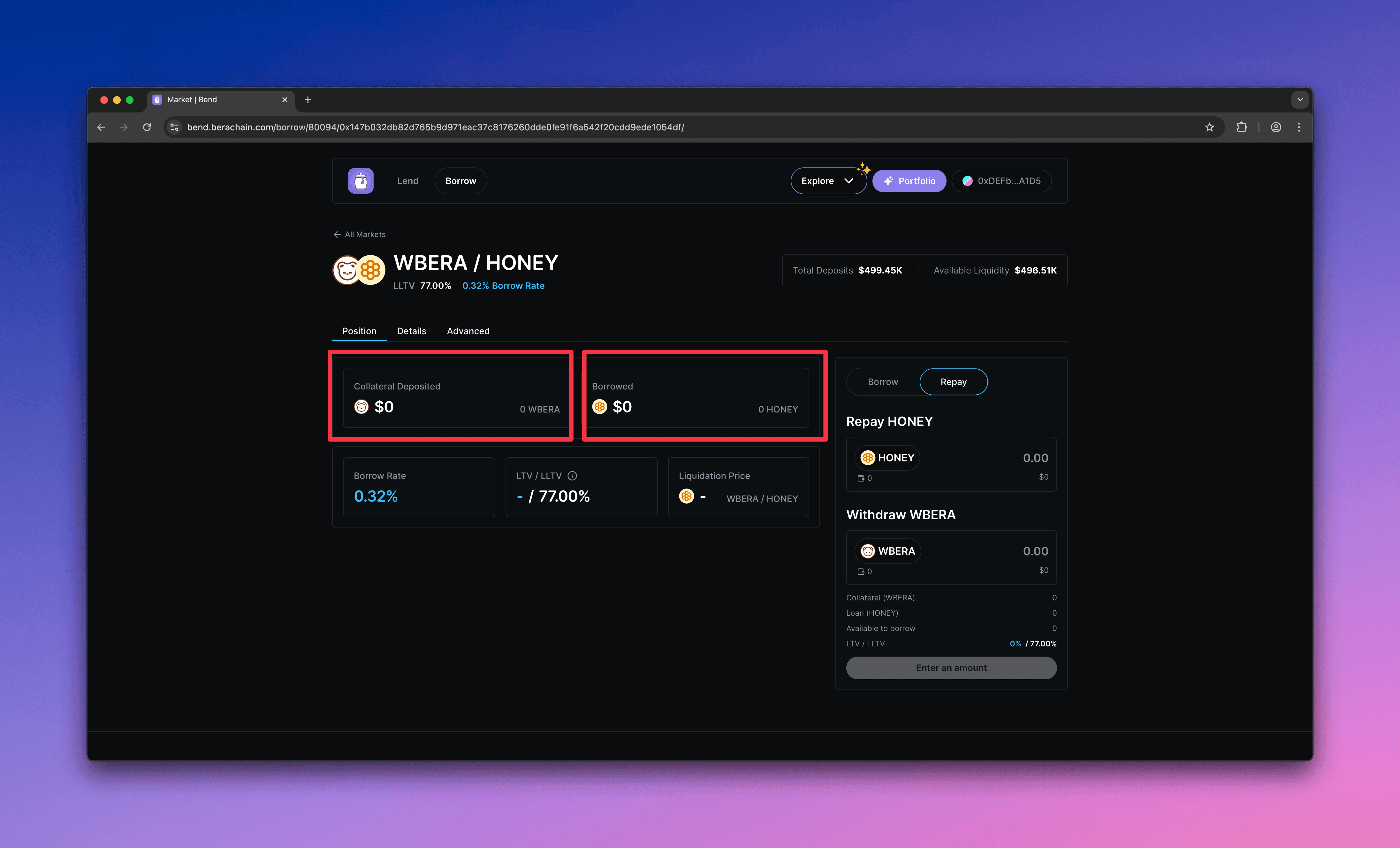
    You should see a zero balance after the repayment.
    <Frame>
      <img src="https://mintcdn.com/berachain-422fce37-docs-staking-pool-install-cli/GpovaHpJph8S_rDh/images/bend/repay-successful-repay.png?fit=max&auto=format&n=GpovaHpJph8S_rDh&q=85&s=1c282febe15cc680681ecdab90a7ed5e" alt="Bend successful repay" width="4384" height="2654" data-path="images/bend/repay-successful-repay.png" />
    </Frame>
  </Step>
</Steps>

You have now supplied collateral, borrowed \$BUSD, and repaid to withdraw your collateral on Bend.